Booked solid, and still not sure what you're making?
The bank balance shows where you were last week, but not what's landing next month.
You quoted it, did it, got paid. Did the work actually make you anything?
The answers are already in your accounts and job app, just not anywhere you can read them.
You do the work. Sidekick does the maths.
It's the offsider who does the numbers you never get time for: Sidekick reads your Xero and ServiceM8 every night and tells you in plain English where the money is.
What Sidekick shows you
Which customers make you money, and which cost you.
Profit per customer after labour and materials, so you can see who carries the business and who quietly drags on it.
Who's booked, three weeks out.
Spot the quiet week coming before it lands, while there's still time to fill it.
One cashflow number, updated every night.
What's owed and what's coming in, set against this time last year.
Where your best work is, and which streets to chase next.
Your customers on a map, next to the suburbs most likely to want what you do.
Built for repeat work businesses
If your customers are on a schedule, the money is in keeping them on it. Sidekick learns each customer's rhythm, seasonal ones included, and tells you who's due, who's slipping and where your runs could be tighter.
Pool servicing, lawns and gardens, cleaning, pest control, maintenance contracts: if the same customers keep coming back, it's built for you.
Who's due
Customers past their usual visit, ready to book.
Who's slipping
Regulars going quiet, flagged before they're gone.
Seasonal work
Services a customer booked this time last year and hasn't booked yet.
Tighter runs
Recurring and one-off work on the map, and jobs that could slot into a run you're already doing.
Money in, money out, and no idea which way it's heading.
Sidekick reads your invoices and payments every night and tells you what's owed, who's slow to pay, and what the next few months look like.

Some customers cost you money, you just can't see which ones.
It puts your labour time and materials against what you charged, customer by customer, so you can see who's worth your time and who needs repricing.
Know how the business is going from your phone, in the van.
You get a short list of what needs doing this week and why, without opening a spreadsheet or waiting on the accountant.
See Sidekick at work
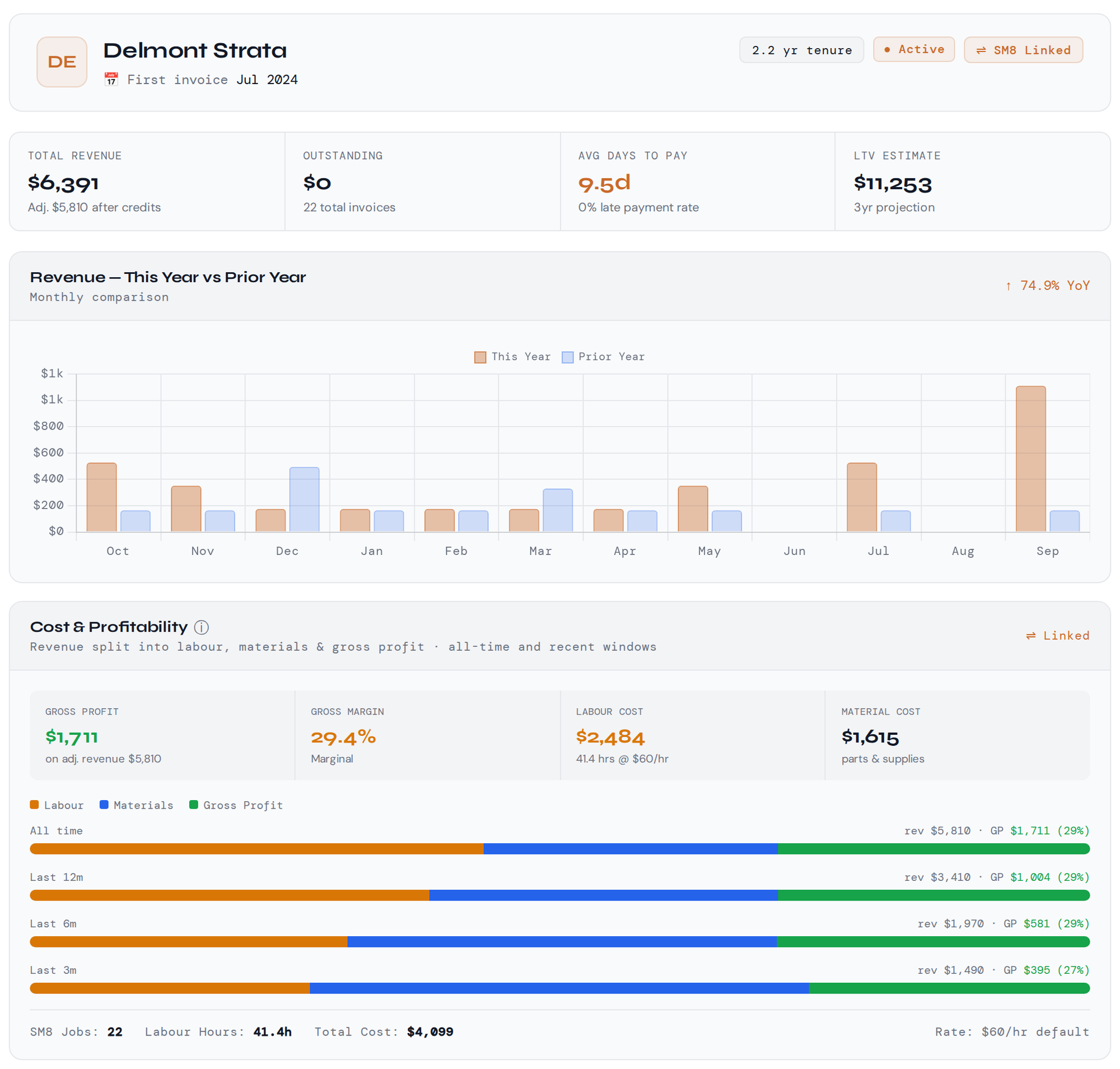
See what every customer is really worth
Every visit, invoice and payment for one customer sits on one page, with the profit left after labour and materials. On a regular like this strata pool you can see the seasonal pattern and this year's price rise straight away.
Demo data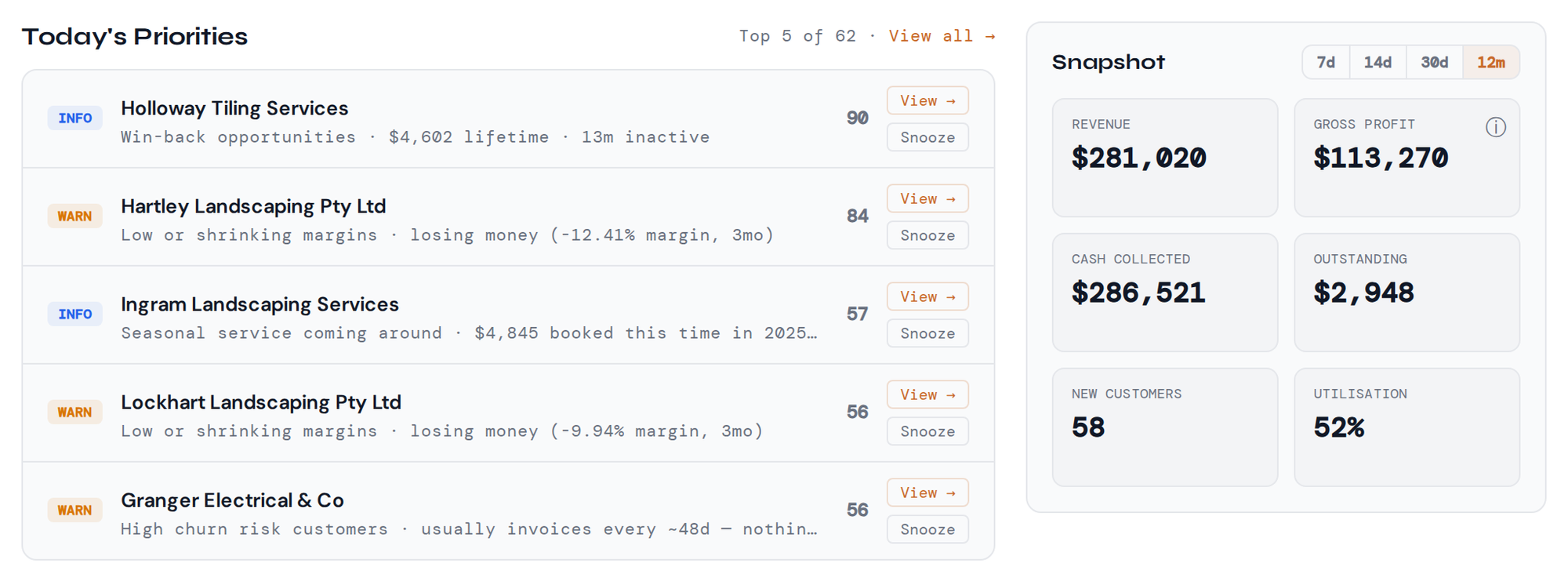
Today's priorities upfront
Your home screen ranks the most valuable things to do today, like an invoice to chase or a customer to book, above a snapshot of how the business is tracking. Two minutes there and you know where the day should go.
Demo data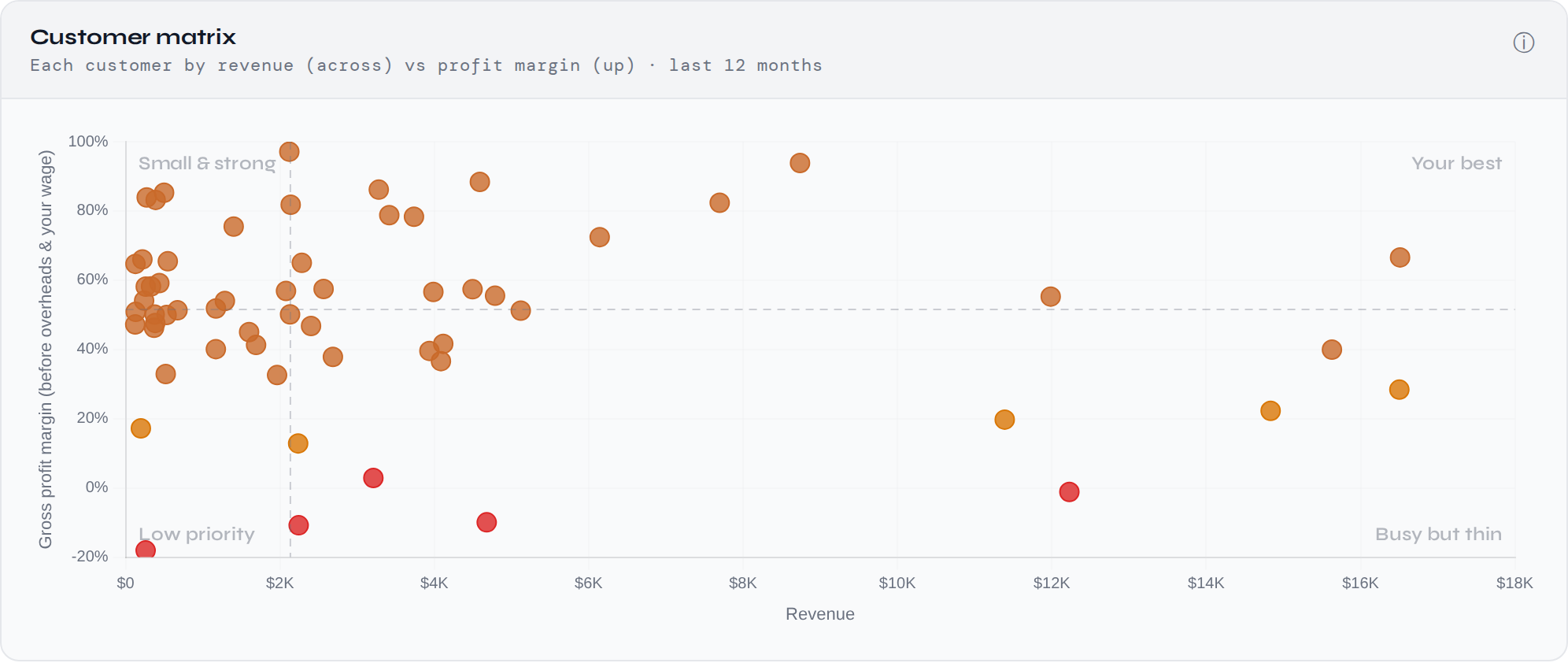
Find your high-value customers
Every customer plotted by what they spend against the margin they leave you. Look after the ones top right; the red dots are costing you money.
Demo data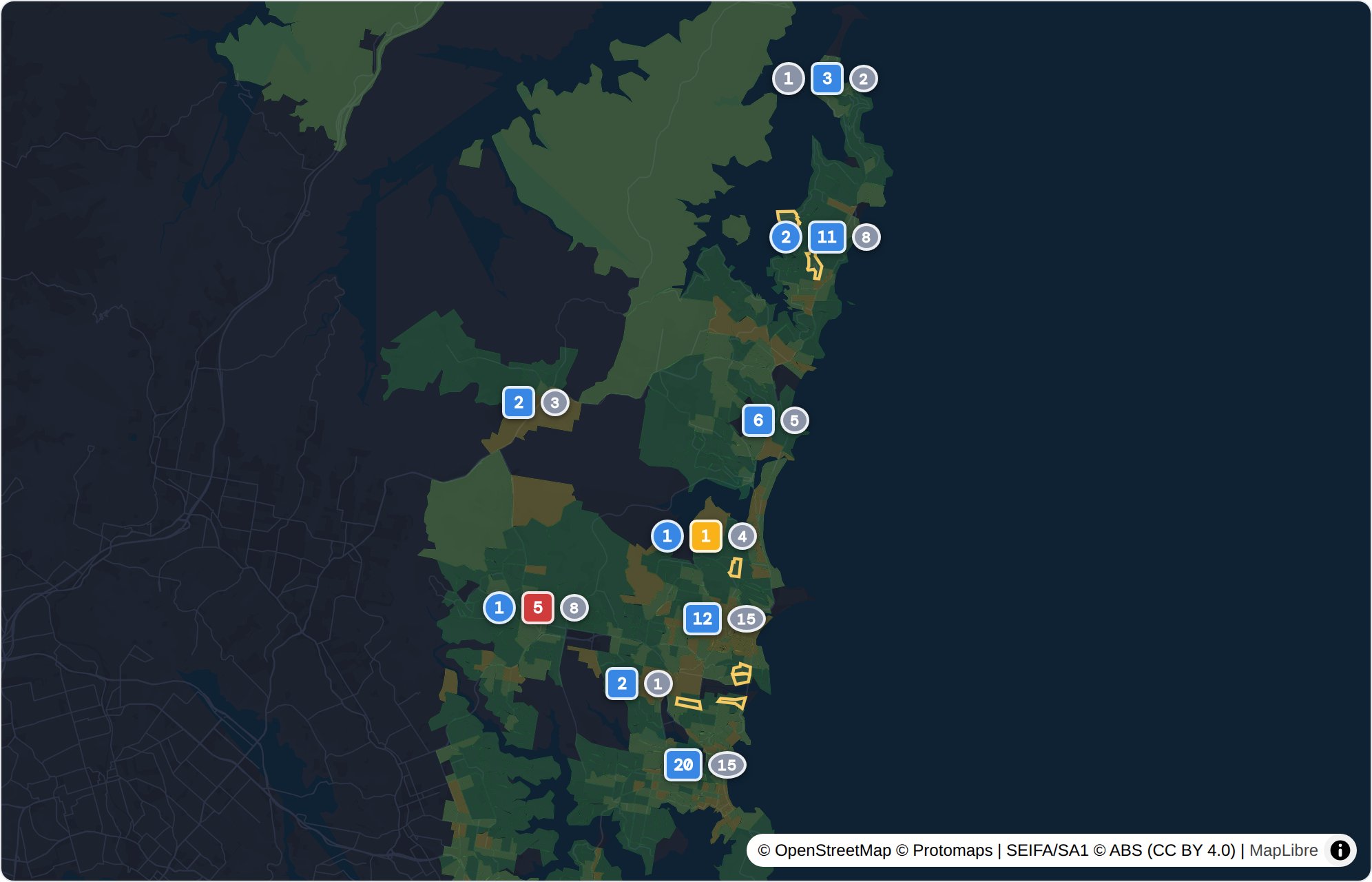
Cut the driving between jobs
Customers close together mean less time driving and more paid hours in every day. Sidekick shows where your work clusters and which nearby suburbs to fill next.
Demo data
See who's carrying the business
For each person you see how much of their paid time is billable, the gross profit each dollar of their wages brings back, and how often their jobs need a callback, which shows where rework is eating into the week.
Demo dataWorks with what you already use
Invoices, payments and your profit & loss, read-only, so nothing in your books ever changes.
Jobs, hours and materials. Connecting it adds profit after labour and materials, the three-week forecast and the map.
Pricing coming soon
- One flat monthly price per business
- No lock-in contract. Cancel any time.
- No per-job, per-customer or per-user fees
- Early access members hear first
Exclusive early access
We're opening Sidekick to a small group of Australian trade businesses first. Register to be one of them, and you'll have a say in what we build next.
Try it free for 7 days
Try Sidekick on your own numbers for 7 days. Tell us about your business and we'll set up your account within a business day; you connect Xero and ServiceM8 and the first sync starts straight away. If you'd like a walk-through, we're happy to do it on a call.
Business intelligence for tradies
Tradies Sidekick is business reporting software for Australian trade and service businesses. Every night it pulls the invoices, payments, jobs, hours and materials out of your Xero and ServiceM8 and works out where you're making money, so there's no spreadsheet to keep and nothing new to type in.
Built for recurring service businesses (pool servicing, lawn and garden, cleaning, pest control, HVAC maintenance) and works for any trade business on Xero and ServiceM8: plumbing, electrical, landscaping and more.
Know which customers are worth your time
For most trade businesses, a few customers earn most of the profit, and some cost money once your labour and materials are counted. Revenue won't show you which is which.
Sidekick ranks every customer by real profit and shows how much of it comes from your best few. It also flags the ones that keep you busy but barely pay, so you know who to look after and who to reprice.
Job costing and customer profit
Sidekick costs the hours and materials on your jobs at your real labour rates and sets them against what you invoiced each customer, so you see which customers pay their way and how your margin moves month by month.
Cashflow and money owed
See who owes you and how late they are, then the next 12 weeks of money in and out beside the same weeks last year.
Capacity and your team
Spot a quiet week in the next three while there's time to fill it, and see whose hours pay for themselves and whose jobs keep needing a callback.
Quoting and pricing
Track how many quotes you win, and check the next one in the quote margin calculator before you send it: it shows what the job will cost you and what to charge for the margin you want. Try the free version.
Where your work comes from
Your customers on a map beside the nearby suburbs most likely to want what you do, which helps when you're deciding where to letterbox or advertise next.
A short list of what to do next
Sidekick picks out the few things worth doing this week, highest value first, like chasing an overdue invoice, billing finished work or booking a customer who's due.
Your data stays yours
- Read-only. Sidekick can't create, change or delete anything in Xero or ServiceM8.
- Australian server, used only to run your dashboard and never shared or sold.
- Encrypted. Contact details, addresses, pay rates and access tokens.
- No lock-in contract. Pay month to month and cancel any time.
Questions
Can Sidekick change anything in my Xero or ServiceM8?
No. Access is read-only, so it can't create, change or delete anything in either.
Do I need ServiceM8?
You need Xero. ServiceM8 is recommended: it adds profit after labour and materials, the three-week forecast, and your jobs on the map with travel time and tighter runs.
Where is my data kept?
On a server in Sydney, with contact details, addresses, pay rates and access tokens encrypted. We never share or sell it.
What does it cost?
Pricing is coming soon: one flat monthly price per business, no lock-in contract. Early access members hear first.
Who is it for?
Australian trade businesses on Xero, especially repeat work like pool servicing, lawn and garden, cleaning, pest control and HVAC maintenance.
Can I leave?
Any time. Disconnect from your account and ask us to delete your data, and we'll do it within 7 days.